| Sign Up For Our Newsletter |

| Sign Up For Our Newsletter |
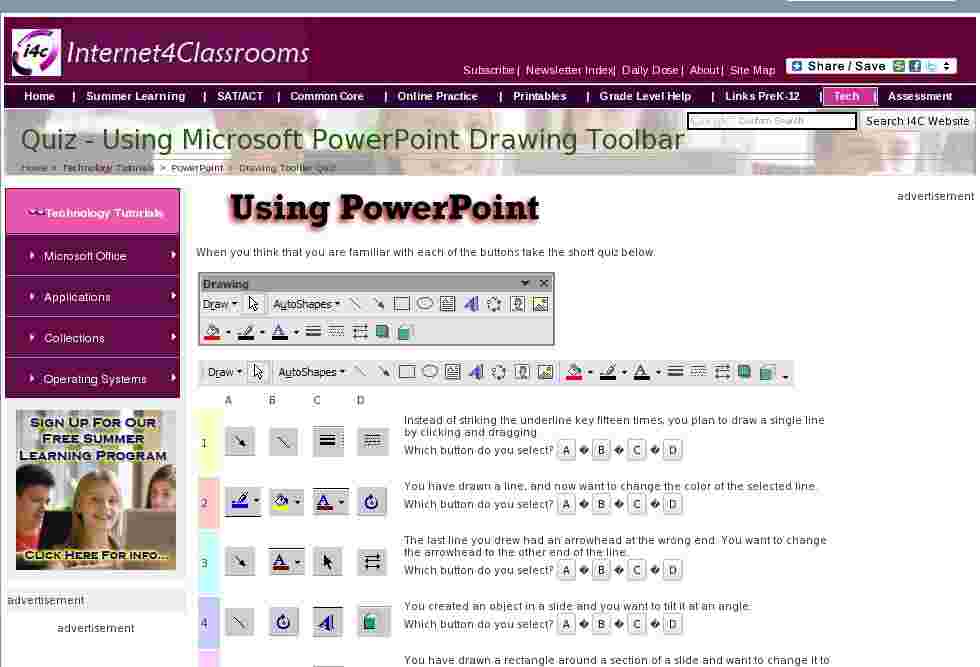
When you think that you are familiar with each of the buttons take the short quiz below.


| 1 |  |
 |
 |
 |
Instead of striking the underline key fifteen times, you plan to draw a single line by clicking and dragging. |
| 2 |  |
 |
 |
 |
You have drawn a line, and now want to change the color of the selected line. |
| 3 | |
|
 |
 |
The last line you drew had an arrowhead at the wrong end. You want to change the arrowhead to the other end of the line. |
| 4 | |
|
 |
 |
You created an object in a slide and you want to tilt it at an angle. |
| 5 | |
 |
|
 |
You have drawn a rectangle around a section of a slide and want to change it to a dashed line. |
| 6 | |
 |
|
|
The title of a slide is just plain text and you would rather create special effects with text. |
| 7 | |
 |
 |
|
You are going to draw a perfect circle on a slide by holding down the shift key, clicking and dragging. |
Other toolbars
Standard | Formatting | Drawing

Internet4classrooms is a collaborative effort by
Susan Brooks and Bill Byles.


advertisement
advertisement
Use of this Web site constitutes acceptance of our Terms of Service and Privacy Policy.


