| Sign Up For Our Newsletter |

| Sign Up For Our Newsletter |
Single Use Spreadsheets
Your students can create spreadsheets designed to accomplish a single task
Download the spreadsheet you see below

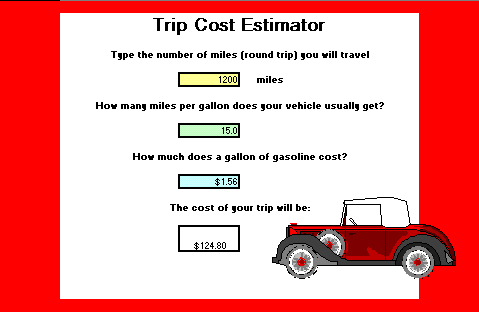
The image above may not look like it, but it is a spreadsheet.
Anything that needs to be decided mathematically can be made into a single use spreadsheet. Some suggestions for this type of calculation include:
- Calculating the price per ounce of a favorite cereal
- Determine the price per square inch of a pizza
- Estimate the price of objects on sale for some given percentage off
- The cost of buying everyone in the world a Coke (remember that old song)
There were three phases in creating the spreadsheet you see above:
- Planning the information needed and how the calculation would be done
- Creating the spreadsheet and writing the equation
- Designing the look of the final product
The following information is needed for this calculation
- The number of miles to be traveled
- The number of miles that the vehicle will travel on one gallon of gas (mpg)
- The average cost of a gallon of gas (rounded to the nearest penny)
The calculation also involves multiple steps
- Determine the number of gallons of gas to be used
- number of miles divided by miles per gallon gives the number of gallons of gas needed
- Determine the cost of the gasoline needed for the trip
- number of gallons of gas needed times the cost per gallon gives the cost of the trip.
Step 1 - Open an Excel workbookStep 2 - Type basic information onto the sheet
- In cell B2 type Trip Cost Estimator
- In cell B4 type Type the number of miles (round trip) you will travel
- In cell D6 type a number of miles
- In cell E6 type the word miles
- In cell B8 type How many miles per gallon does your vehicle usually get?
- In cell D10 type a number of miles per gallon
- In cell B12 type How much does a gallon of gasoline cost?
- In cell D14 type the typical cost of a gallon of gas
- In cell B16 type The cost of your trip will be:
- In cell D18 you will enter an equation
Step 3 - Determine what the equation should be.
First the number of miles (in cell D6) should be divided by the number of miles per gallon (in cell D10)
Then that number of gallons is to be multiplied by the cost of a gallon of gas (in cell D14)The above statement is typed into cell D18 as:
=(D6/D10)*D14Step 4 - As soon as the equation is entered into D18, the cost of the trip is calculated.
Step 5 - Save your work
Step 6 - Enter data for another trip, use a different number of miles and miles per gallon.
Phase 3 - Designing the look of the final product
Step 1 - While I could still see the gridlines, I used the Merge & Center button on the cells in column B which contained textStep 2 - Next, I removed the grid lines. Actually I covered up the lines
- Select All on the worksheet you are using - PC depress Ctrl key and tap the A key, Mac depress Command key (Apple) and tap the A key
- Use the Fill Color button to make the sheet a solid color. I used white.
Step 3 - Use the Fill Color button to draw the red border, and to highlight the cells where data will be entered.
Step 4 - Use the Borders button to place a dark black around the cells where data will be entered.
Step 5 - Find a clip art image to match the topic of your single use spreadsheet.
Step 6 - Begin looking for another idea for a single use spreadsheet.
Sample Single Use Spreadsheets
Fahrenheit to Celsius temperature converter - Enter either temperature and instantly see the other temperaturePizza Calculator - calculate the price per square inch - Enter the diameter of the pizza and the price, find out how much the pizza costs per square inch.
Trip Calculator - How much will a car trip cost? - Enter the distance between two locations, the current cost of gasoline and the number of miles per gallon which a car uses. Find out the fuel cost of the trip

Internet4classrooms is a collaborative effort by
Susan Brooks and Bill Byles.


advertisement
advertisement
Use of this Web site constitutes acceptance of our Terms of Service and Privacy Policy.