| Sign Up For Our Newsletter |

| Sign Up For Our Newsletter |

MS Word Menu Items
Using Tools, Window, or Help menu items
Macintosh version
The most commonly used items from the Tools, Window and Help menus will be explained. A quiz will follow.
Tools menu

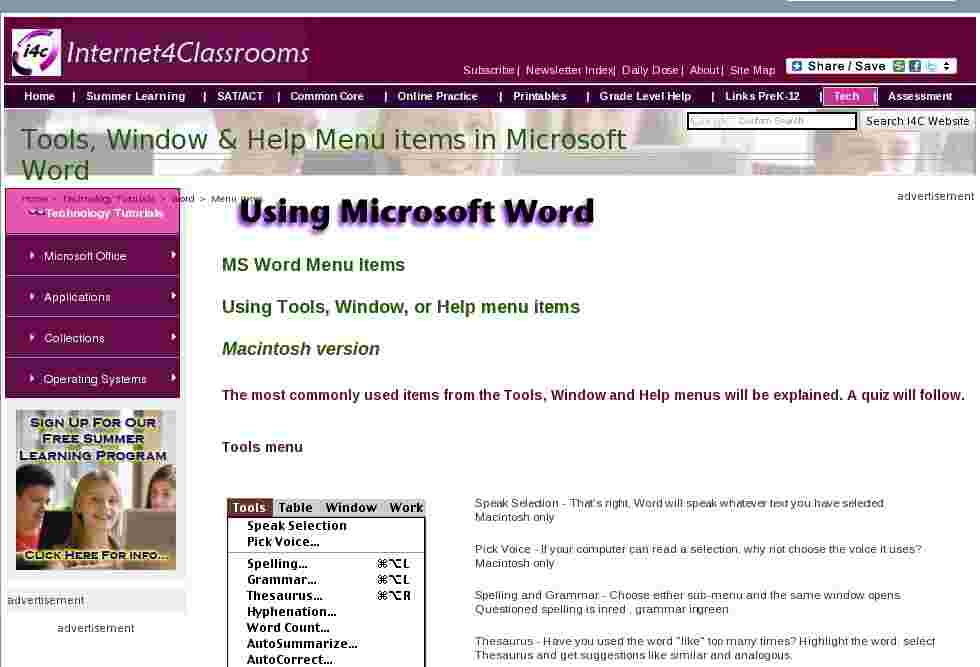
Speak Selection - That's right, Word will speak whatever text you have selected. Macintosh only
Pick Voice - If your computer can read a selection, why not choose the voice it uses? Macintosh only
Spelling and Grammar - Choose either sub-menu and the same window opens. Questioned spelling is in red , grammar in green .
Thesaurus - Have you used the word "like" too many times? Highlight the word, select Thesaurus and get suggestions like similar and analogous.
Word Count - Need to know how many words are in your document? Select Word Count and find out how many pages, words, characters, paragraphs, and lines.
Auto Summarize - Exactly what it sounds like, Word summarizes the document, reducing the length of the document, keeping the meaning.
Auto Correct - Word will automatically correct some things. If this feature is irritating to you, come here to change what is corrected.
Preferences - Modify Word settings here. Modify print, editing, spelling and other options from this sub-menu.
Customize- Opens the same window that you get by going to the View menu and selecting Toolbar/Customize.
Window menu
New Window - This opens another window with a copy of the active document.

Arrange All - Displays all open files in the window. This makes dragging and dropping from one document to another much easier.
Show Clipboard - This is a valuable feature. If you do not remember the last item copied select this sub-menu to see text or images in the clipboard.
Open Document List - There is no need to drag windows to the side so you can see other documents open in Word. Come to the bottom of this window for a listing of all open documents. The active document has a check mark beside it.
Help menu

Show Balloons - If you are not sure what a menu does, turn on Balloons, put your cursor on the menu item and get a short explanation.
Microsoft Word Help - Open Word's Assistant and get a search box to type in. Word displays possible matches for you to read about.
Contents and Index - See an index of all topics available in Word's Help documentation.
Help on the Web - That's right! It is exactly what it sounds like. Select a link and a Microsoft help page is opened in your browser. If you are not online, Word will make the connection and then display the page.
Online Registration - If you have ever installed any software application on your computer you have seen those reminders to register the product online. Well, Microsoft keeps the reminder around in case you didn't register when you installed the software. Isn't that considerate of them!
2. You want to see two documents at the same time so you can drag text from one document to another. Which menu do you select?
* 3. A word has been used too many times in your document and you need suggestions for another word to use. Which menu do you select?
* 4. Grant application rules state that a maximum of 500 words are allowed and you don't want to count each word you typed. Which menu do you select?
* 5. You are about to paste something in the document, but you are unsure about what is in the clipboard. Which menu do you select?
* 6. A button is missing from the formatting toolbar. You want to put it back in the bar. Which menu do you select?
* 7. You forgot to register Microsoft Office when you installed it. Which menu do you select?
* 8. You have seven documents open and want to move from one document to another. Which menu do you select?
* 9. You want to be
curtaincertain that all of your words are spelled correctly. Which menu do you select?
* 10. You have typed a short greeting to your class and want the computer to read it to them. Which menu do you select?
*
Go to Using Keyboard Shortcuts in Microsoft Word
Go back to Using Microsoft Word to Produce Classroom Documents

Internet4classrooms is a collaborative effort by
Susan Brooks and Bill Byles.


advertisement
advertisement
Use of this Web site constitutes acceptance of our Terms of Service and Privacy Policy.


